The assistant looks at your drawing
A traced picture has no names in it. The hat, the coat and the glass of a magnifying glass are unnamed shapes, known only by their colour and position, and "make the hat red" has to be worked out from those. When it is not sure which shapes you mean, the assistant now looks at the drawing: it outlines the shapes it suspects, sees which ones sit on the part you named, and edits those.
Opens a kite drawn like a traced picture, in two reds, with birds in the same reds. Sign in for free, then ask "make the kite purple".
How it works
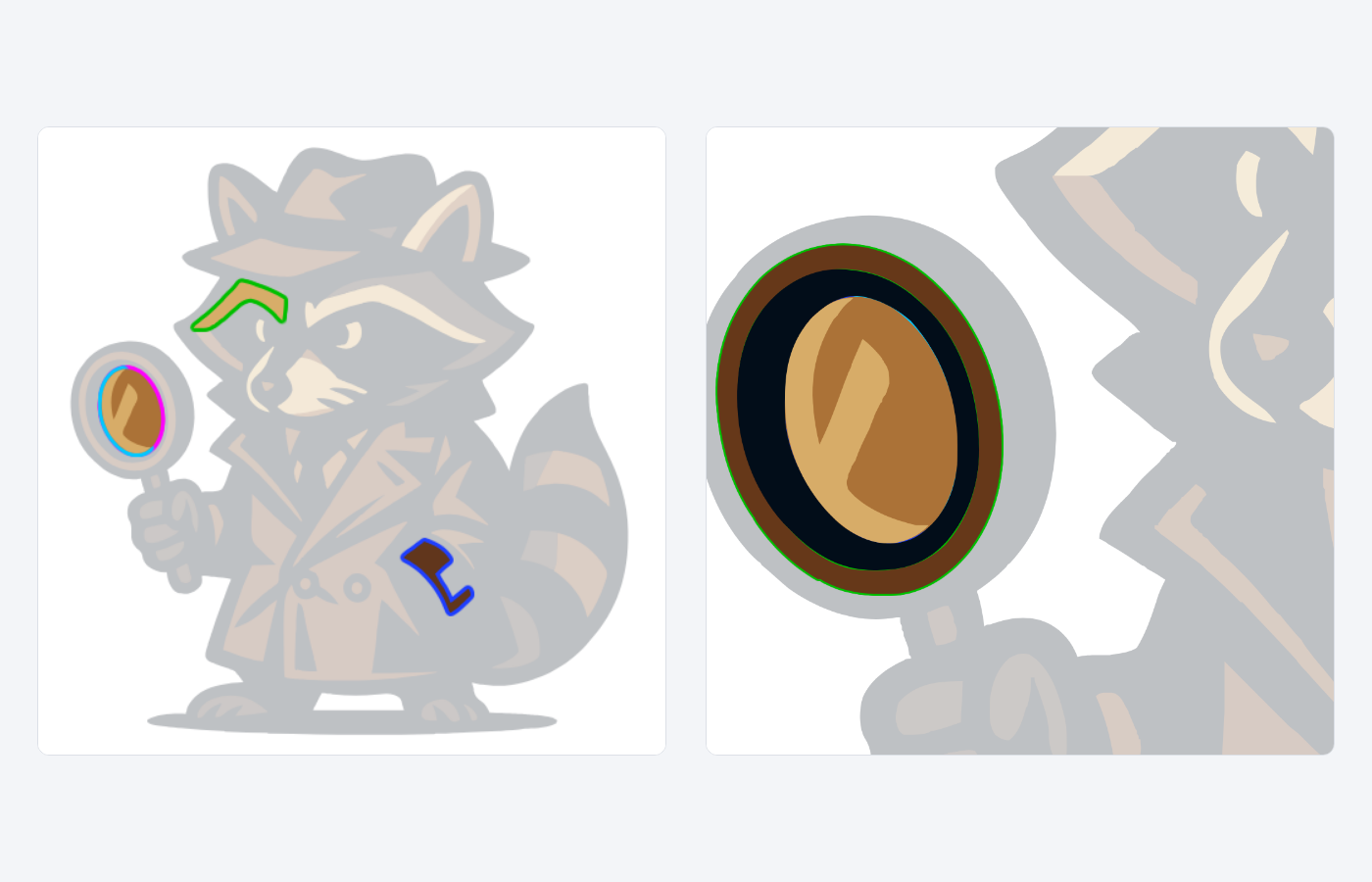
Looking is one of the assistant's tools, and it decides when to use it. Your browser draws the current drawing as a picture and hands it to the model, with up to four shapes outlined, each in its own colour: magenta, cyan, green and blue. Everything else is faded, so the outlined shapes stand out. Beside the picture, the model is told which element each outline is, the line of the file it starts on, its colour and where it sits.
It can also look closer. A crop draws one region of the drawing at full size, which helps with small parts such as an eye or a button. When it has looked, the steps listed under its reply include get_png_image.
When it helps
It matters most in drawings that came from an image generator or a tracer, where every shape is an unnamed path and one colour often appears in several parts. Asked to recolour the coat, the assistant used to pick shapes by colour and position alone, and could repaint the fur of the same brown with it. Now it can check, before the edit, that the shapes it chose are the coat.
A part drawn in several shades, such as a ball with a highlight and a shadow, is several shapes. The assistant is told that every piece inside the part's outline belongs to it, so the highlight should change colour with the ball. Smaller models still leave a piece behind now and then; when one does, name the piece in your next message.
A drawing whose shapes have meaningful ids or classes, or whose parts are text, needs no look: the code already says which part is which.
Good to know
- Only models that can see images can look. Two text-only models, DeepSeek-V4-Flash and Kimi-K2.6, edit from the code alone, as before.
- A model can still misread a picture. In our tests, gpt-5.4-mini took the amber lens of a magnifying glass for a reflection and recoloured only its highlight. If a result is wrong, say which part it missed, or try another model.
- Shapes that touch the part you name can be taken for it. Asked for a red hat on a raccoon, models sometimes painted the ears that stick out from under it.
- A request costs its usual credits, however many times the assistant looks.
Questions
Is my drawing sent anywhere new?
No. The picture is drawn in your browser and goes to the same AI provider that already receives your drawing's code with each request. It is not kept with the conversation: a turn keeps its two newest pictures, and none are saved with the chat.
Can I make it look?
Name the part in your request, as in "make the hat red". When the drawing does not say which shapes that is, the assistant looks on its own.
Does it help with icons and generated pictures?
Those have tools of their own. An icon comes from the icon library as a box the assistant places in your drawing, and a new picture is generated and traced. Looking is for finding and changing parts of the drawing you already have.