EditSvgCode in Claude
Claude can now work on your drawings directly. Add EditSvgCode to Claude as a connector and Claude creates, opens and edits the SVG drawings in your account, changing only what you asked for and showing the result in the chat. It can bring in a file from your computer, and paint a picture that is traced into SVG, with the price on a card you confirm first. The AI work runs on your Claude plan, so it costs no EditSvgCode credits; only generating pictures does.
A lot of SVG is written in chats now. Someone asks Claude for a logo or an icon, gets a block of markup, and brings it here to see it, fix it or change it. This update works the other way round: Claude can now open EditSvgCode itself and work on the drawing where it is kept.
Add it once
EditSvgCode is now an MCP server. MCP, the Model Context Protocol, is the open standard Claude uses to reach other services. Press Add to Claude and Claude opens its Add custom connector dialog with our name and address filled in. Claude warns that the connector came from a link, as it does for every connector outside its own directory. Check that the address is editsvgcode.com/mcp, press Continue, sign in to EditSvgCode and press Allow.
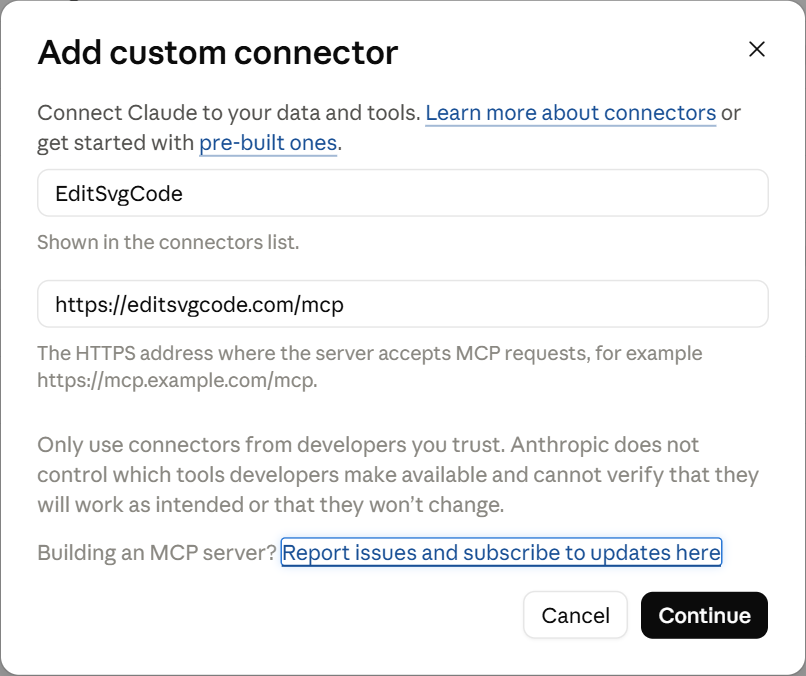 Claude's Add custom connector dialog with the name EditSvgCode and the address https://editsvgcode.com/mcp filled in. From then on it is in Claude on the web, on the desktop and on your phone.
What changes when Claude has the drawing
Asked for SVG in a plain chat, Claude writes the whole file out, and every change means writing it out again. A long drawing gets cut short, a coordinate drifts, and the change you wanted arrives alongside three you did not.
With EditSvgCode connected, Claude works on a saved drawing instead. It makes a change the way you would in the editor: set the fill on these three shapes, rewrite this label, remove that group, recolour one region of a traced path. Everything it did not address stays exactly as it was, and each change is saved to your account as it is made. Claude shows the drawing in the chat, rendered, after each round, so you see the result rather than markup.
Every drawing it makes has its editor link. Open it here to look at the code, drag a shape, export a PNG or publish it to the gallery, and Claude can pick it up again later by name.
Your files
Ask Claude for your files and it shows your saved drawings in the chat, newest first, with a small preview of each. The same list has a box to drop an SVG file from your computer into. That is the way to hand Claude a file of yours: a file attached to the chat stays with Claude and never reaches EditSvgCode, while one dropped in the box is saved to your account, where Claude can open it.
Pictures
Some things are better painted than drawn with a few shapes: a character, an animal, a scene. Ask for one and Claude puts a card in the chat with the prompt and its price. You can reword the prompt there. Nothing is made or charged until you press Generate. The image model paints the picture, your browser traces it into SVG, and the result is saved as a new drawing. Asking for a change, such as a different pose, a hat or another expression, brings up the same card, which redraws the picture and keeps the original.
What it costs
The thinking is Claude's, so your Claude plan pays for it. In the editor, every request to the AI assistant costs credits; here the conversation and every edit Claude makes cost no EditSvgCode credits at all. Opening drawings, the files list and uploads are free too.
Only pictures use credits, the same as in the editor: 10 with gpt-image-1-mini, the default, shown on the card before you press Generate.
Other apps
The address, https://editsvgcode.com/mcp, works in other apps that connect to MCP servers over the web. In Claude Code it is one command, claude mcp add --transport http editsvgcode https://editsvgcode.com/mcp, and VS Code takes it as an HTTP server. Apps that show no cards in the chat open the picture card in the editor instead. The MCP page has the details.
What changed
EditSvgCode is an MCP server at https://editsvgcode.com/mcp. Add it to Claude as a custom connector and sign in with your EditSvgCode account.
Claude edits a saved drawing element by element, like the assistant in the editor, so coordinates, formatting and everything it did not address stay as they were. Each change is saved to your account at once.
Claude shows the drawing in the chat, rendered, after each round of changes, with its editor link.
Asked for your files, Claude lists your saved drawings in the chat with a preview of each, and a box to drop an SVG file from your computer into.
Pictures and changes to pictures come with a card in the chat that shows the prompt and the price in credits. Nothing is made or charged until you press the button.
Claude's conversation and edits use your Claude plan, not your EditSvgCode credits. Only pictures are charged in credits.
The same address works in Claude Code, VS Code and other apps that connect to MCP servers over the web.